Top 9 AdvancedMD Alternatives For Your Business in 2026



If you like AdvancedMD for its end-to-end EHR, practice management, RCM stack but you are wrestling with cost, complexity, training time or lighter patient-engagement tools, you are not alone. Many clinics including multi-location groups start with AdvancedMD for its denial worklists, A/R controls and analytics, then look for alternatives or add-ons that deliver simpler workflows, stronger omnichannel messaging, review growth and faster patient self-service.
According to KLAS Research, clinician satisfaction with cross-system data sharing and integrated workflows remains low, with fragmentation across EHR, billing, and patient engagement systems continuing to drive operational inefficiencies and increased administrative workload in provider organizations.
This article breaks down the best AdvancedMD alternatives in 2026, who they are best for, and how they differ so you can pick software that fits your staffing model, budget and growth goals.
AdvancedMD is a configurable, enterprise-leaning platform that combines EHR, practice management and revenue cycle management. The platform is known for eligibility checks, claim scrubbing, denials worklists, ERA posting and robust analytics/BI, plus clinical tools like templates, eRx, eLabs and telemedicine. On the patient side, it offers online intake, reminders, portal and basic messaging. It’s designed to standardize operations across multi-provider, multi-location organizations.
Clinical care: Customizable EHR templates, problem lists, order sets
Scheduling & front desk: Advanced scheduling templates/slot rules, multi-location calendars
Billing & RCM: Claim scrubbing, ERA/EDI, denials worklists, A/R dashboards
Engagement & communications: Appointment reminders and basic two-way messaging
Analytics & admin: Dashboards/BI across clinical, financial, and operational KPIs
| Pros: | Cons: |
|---|---|
| RCM muscle built-in: Eligibility checks, claim scrubbing, denials worklists, ERA posting, and A/R dashboards reduce leakage and days in A/R | Complex to implement: Requires heavier onboarding and organization-wide workflow standardization |
| Enterprise-grade scheduling: Templates, slot rules, and multi-location calendars for complex provider coverage | Training time & learning curve: Power features add clicks and require structured training/SOPs |
| Robust analytics/BI: Visibility across clinical, operational, and financial KPIs with filtering by location, provider, payer, service line | Higher total cost of ownership: Core licenses + reminders, intake, analytics, texting, etc., can increase long-term cost |
| Configurable EHR: Flexible templates, eRx/eLabs, telemedicine, and scalable tasking infrastructure | Patient engagement is basic out of the box; most groups add a unified inbox or automation layer (e.g., DemandHub) |
| Governance & security: Role-based access, audit trails, multi-site controls suited for compliance-heavy orgs | UI density: Feature-rich screens can feel busy vs newer cloud-first apps |
| Ecosystem depth: Marketplace for payments, engagement, clearinghouse, and extensions | Support variability: Experience differs by module and account tier; strong SLAs usually need premium plans |
Total cost vs. actual usage: Licenses, texting/intake/analytics add-ons and clearinghouse/SMS fees can push TCO well beyond the initial quote across multiple sites.
Complexity & training burden: Power features are great, but they introduce clicks, workflows, and permissions that require structured onboarding and ongoing SOPs. Smaller teams can feel overtooled.
Patient engagement gaps: Out of the box, AdvancedMD’s reminders/portal are solid, but many groups want a unified inbox (SMS, Web Chat, Google Business Messages, FB/IG, email), review automation, missed-call textbacks, and text-to-pay often requiring an external layer.
Self-service expectations: Patients now expect online self-scheduling/rescheduling, smart waitlists, and mobile intake that reduces phone time; teams seek tools that make these flows effortless.
Marketing & growth under one roof: Owners want reviews, listings, web chat, campaigns, and attribution reporting to drive new-patient volume.
Analytics depth & usability: Finance and ops leads ask for role-based dashboards, cohort analysis, campaign ROI and no-show/utilization trends that are easy to slice without building custom reports.
Multi-location governance: Centralized template management, bulk updates, standardized comms, and cross-location insights can be hard to maintain without additional tooling.
Integration strategy: Teams with existing websites, CRMs, or marketing stacks prefer systems that plug in cleanly via APIs and webhooks rather than forcing all functions into one vendor.
Change management pace: Feature rollouts and configuration changes may move slower than front-office needs, prompting clinics to add nimble point solutions for immediate impact.
Below are top 9 alternatives to consider. To keep this practical, I have added a quick “What it does,” who it’s best for, features, pros/cons and some real feedback from G2, Capterra, Gartner and others.
What it does:
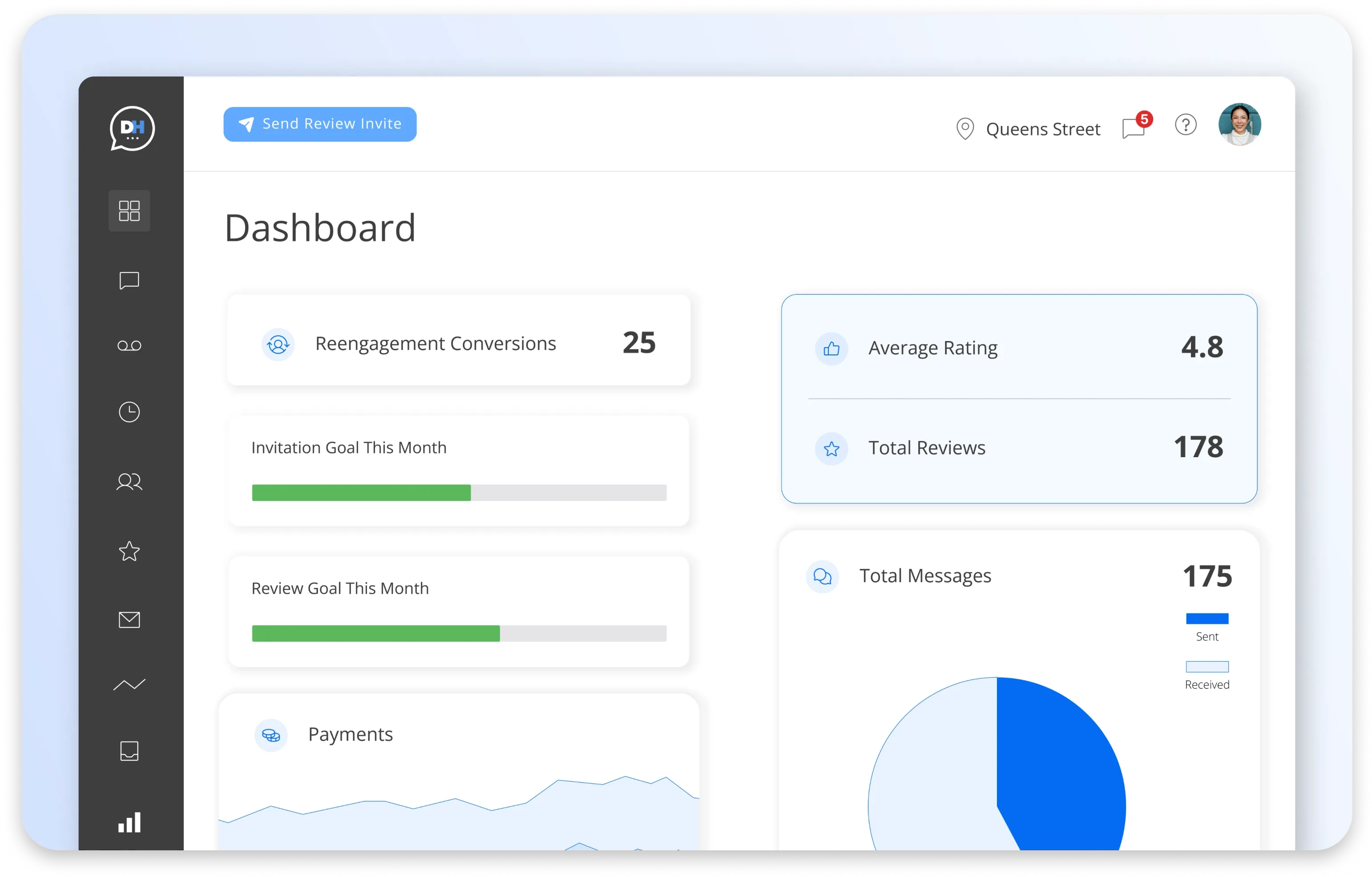
DemandHub is an AI-powered patient engagement and growth platform that layers on top of your current EHR (including AdvancedMD). It centralizes SMS, Web Chat, Google Business Messages, Facebook/Instagram DMs, and email in a single inbox, then automates the busywork: review requests, lead follow-ups, recalls/reactivations, online booking, and text-to-pay. The goal is to give more new patients, faster responses, fewer no-shows without touching your clinical/billing stack.
Best for:
Practices that want modern communications + reputation growth without replacing their EHR or retraining the entire team.
Key features:
Unified inbox for SMS, Web Chat, GBM, FB/IG and email
AI follow-ups for reviews, reactivation, missed-call textbacks, and lead nurturing
Web Chat / SMS so conversations continue after visitors leave your site
Online scheduling widgets with smart reminders/recalls
Text-to-pay for deposits, balances, and quick collections
Lead Manager and Team Chat to route inquiries and collaborate
Insights & ROI dashboards for response time, review velocity, booked-from-chat
| Pros | Cons |
|---|---|
| Fast wins in reviews, web-lead capture, and show rates | EHR integrations are growing but may be lighter than legacy all-in-one systems |
| Easy to deploy and train in hours for front-desk teams | Best fit is solo to mid-sized groups; very large enterprises may want extra governance |
| Affordable, transparent plans compared to all-in enterprise suites | |
| Plays nicely with your current EHR/PM |
Pricing:
Starts around $59/month, plan-based.
Why choose it over AdvancedMD alone?
AdvancedMD’s reminders/portal cover the basics, but DemandHub adds the omnichannel inbox, review engine, Web Chat / SMS, and text-to-pay that front desks use every hour. Most clinics see quicker uplift in new-patient flow and response speed by layering DemandHub without disrupting billing or documentation in AdvancedMD.
REAL customer feedback:
Here is what people say about DemandHub:
Demandhub provides a single point of contact for reaching out users across multiple channels such as Email, Sms, Whatsapp, social media etc. One feature which stands out is asking users to rate our services on google platforms. This has helped us in improving our ratings. - Source (Gartner)
We love how the chatbot chat turns into a text message thread so the client does not need to stay on our website in order to get their questions answered or appointments booked! Customer support is really responsive and helpful. - Source (G2)
Great customer experience and they were very patient with walking me through the onboarding process and usage. Has all the tools I need. - Source (Capterra)
What it does:
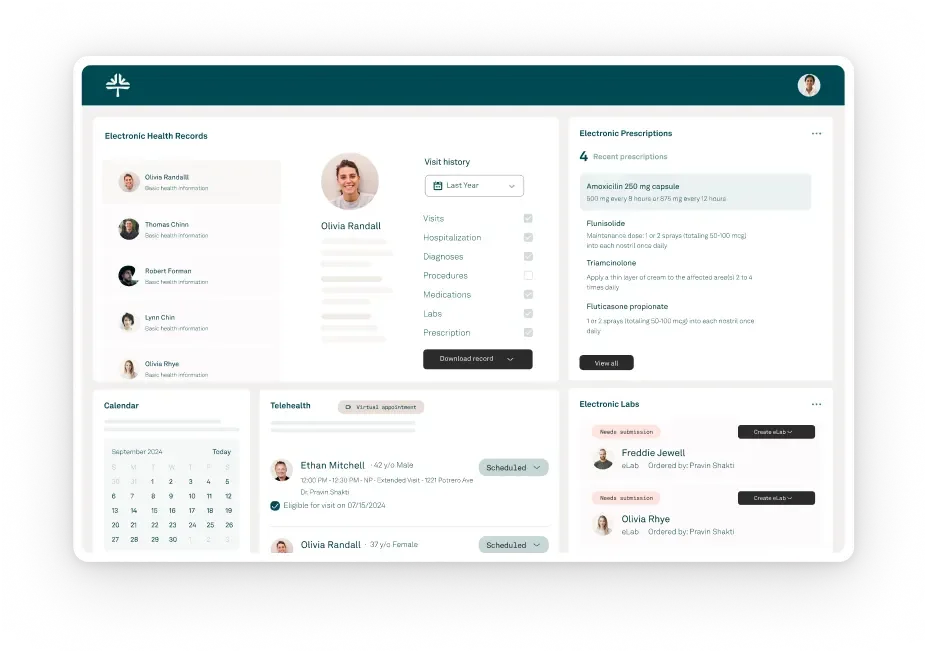
Tebra combines EHR, practice management, billing/RCM and patient-growth tools into one connected platform. Think about the front office, back office, online growth under a single login charting and claims on one side, online scheduling, reminders, review generation, directory sync and text-to-pay on the other.
Best for:
Independent and multi-location clinics that want a single vendor for clinical workflows, revenue cycle and patient acquisition without stitching together separate point solutions.
Key features:
Clinical: EHR with templates, eRx/eLabs, telehealth, tasking
RCM: eligibility, claim scrubbing, ERAs, denials worklists, A/R dashboards
Patient experience & growth: online booking, reminders, reviews & directory listings, website builder/SEO, reputation analytics
Payments: card-on-file, text-to-pay, estimates
Analytics: clinical, financial and marketing dashboards
| Pros | Cons |
|---|---|
| True all-in-one stack | Quote-based pricing; total cost can rise with modules/volume |
| Strong RCM depth with denial/AR controls | Heavier onboarding and change management than SMB tools |
| Built-in reviews/listings/website to increase demand | You may pay for modules you won’t fully use if needs are narrow |
| Standardizes processes across multi-location groups | Some teams report mixed support experiences by module |
Pricing:
Custom/quote-based
REAL Customer Reviews:
Here is what people say about Tebra.
“They stole over 20k. They recommended a shady untrustworthy biller. Everything was a lieThere isn’t enough room for all the terrible things I have to say about these shady people.” - Capterra
“POOR. I do not recommend even considering buying this product.” Software Advice
“Poor customer service and lack of support.” - G2
Related: Top Tebra Alternatives for Your Business in 2026
What it does:
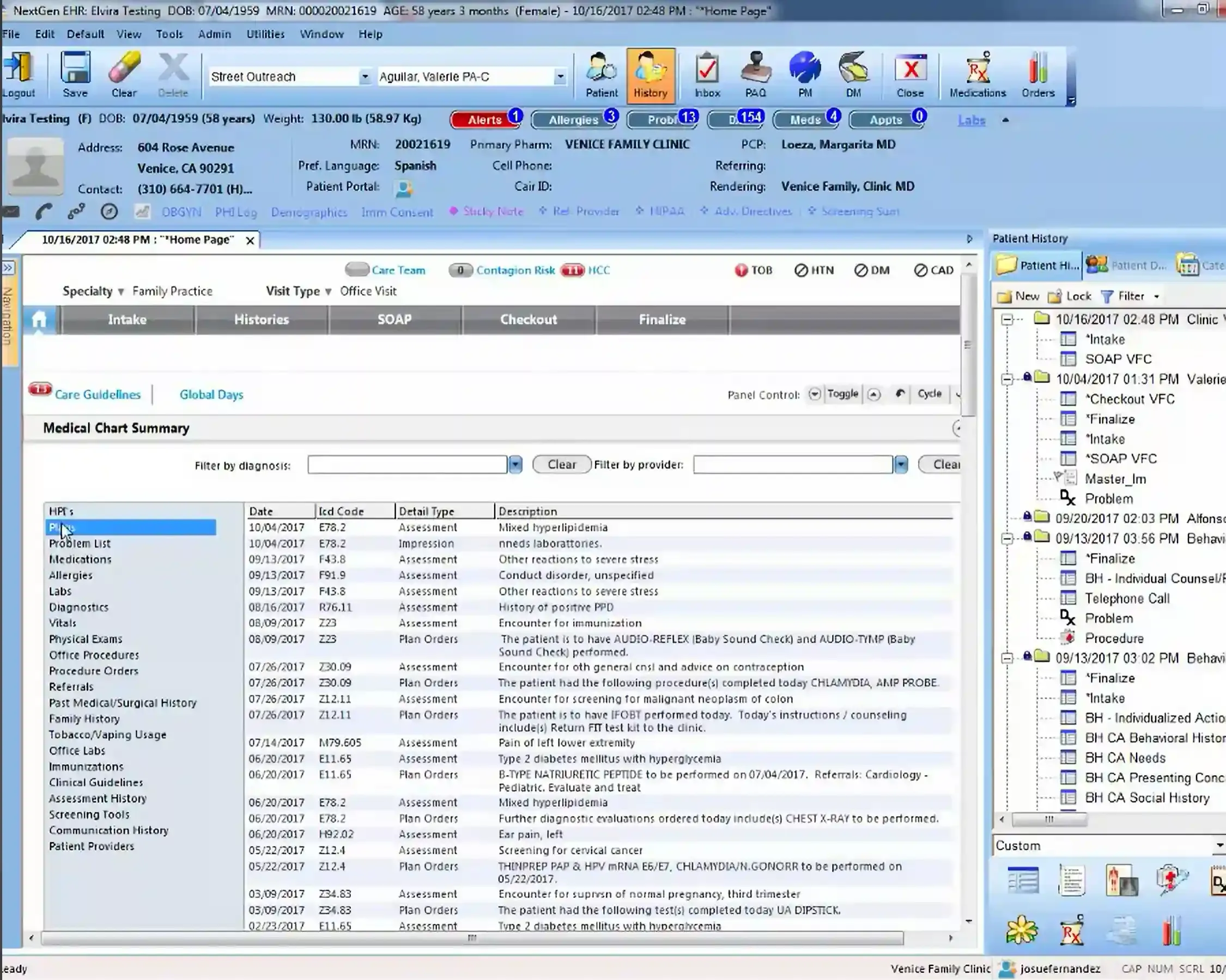
NextGen is an enterprise-leaning EHR + practice management platform with strong patient access (self-scheduling, portal, secure messaging), robust specialty content, and regulatory depth. It’s built to standardize multi-location operations while giving clinical teams configurable templates, orders, and tasking.
Best for:
Multi-provider or multi-specialty groups that want deeper patient-access tools and mature compliance reporting especially those centralizing operations across locations.
Key features:
Patient access: online self-scheduling, portal, secure messaging, intake
Clinical: specialty templates, orders, eRx/eLabs, telehealth, care plans
PM/RCM: eligibility, claims/ERAs, denials workflows, statements, payment plans
Quality & compliance: eCQMs, MIPS/MACRA reporting, audit trails
Analytics: role-based dashboards and ad-hoc reporting
| Pros | Cons |
|---|---|
| Strong self-scheduling/portal experience tied to the chart | Heavier implementation and admin ownership vs SMB tools |
| Broad specialty content and configurable workflows | UI density/complexity can challenge small teams |
| Solid regulatory and quality reporting for value-based programs | Pricing is custom and can trend premium with modules |
| Scales well for multi-site governance | For omnichannel reviews/GBM/DM inbox, many groups still add a growth layer |
Pricing:
Quote-based that varies by providers/sites and selected modules.
REAL Customer Reviews:
Here is what people say about NextGen:
“Ineffective texting and emailing utilization without the required patient portal.” - Software Advice
“It’s sometimes very slow, we get a lot of down time, e-rx doesn’t work sometimes, patients complain that their scripts are not making it to the pharmacy. You have to be a member of the “community” in order to teach yourself how to do certain things.” - G2
What it does:
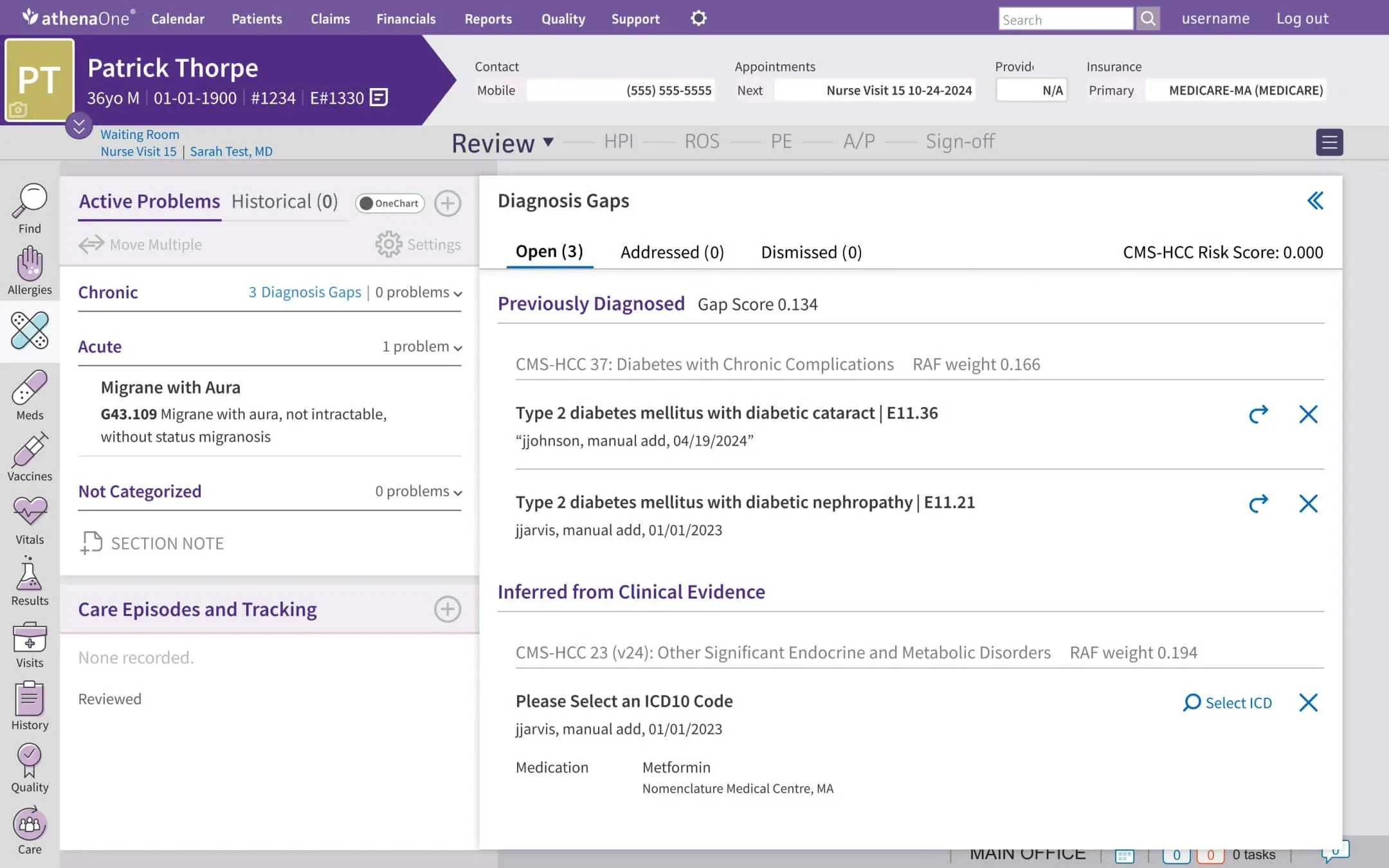
athenaOne bundles EHR, practice management, and RCM with a networked rules engine and payer connections aimed at improving clean-claim rates and reducing admin friction. Patient-facing tools (portal, messaging, reminders, intake) round out access and communication.
Best for:
Groups that prioritize billing performance and payer compliance at scale, and want a vendor-driven approach to RCM operations with predictable processes.
Key features:
EHR & orders: templates, problem lists, eRx/eLabs, telehealth, tasking
RCM: real-time eligibility, claim edits/scrubbing, denial analytics, ERA posting
Practice management: scheduling, recalls, work queues, payment plans
Patient access: portal, secure messaging, reminders, intake
Analytics: operational and financial dashboards; benchmarking from network data
| Pros | Cons |
|---|---|
| Strong clean-claim and denial-prevention tooling | Implementation and change management can be substantial for smaller teams |
| Network effects maintained centrally by vendor | Pricing is custom; total cost can rise with RCM/service scope |
| Solid PM + RCM workflows for multi-location groups | Omnichannel growth features like reviews, GBM/DM inbox, web chat often paired with an engagement layer |
| Patient tools integrated with scheduling and charting | Config changes and custom reports may require vendor involvement |
Pricing:
Quote-based; varies by providers, locations, and whether you use vendor RCM services.
REAL Customer Reviews:
Here is what people say about athenaOne:
“It reminds me of a portal that a huge medical center would use, which for hospitals etc is understandable, but for my primary care or psychiatrist using this portal makes it feel incredibly impersonal like I’m just another number in the system.” - Software Advice
“Let me start by saying this is my seventh EMR. A whole lot. It’s clunky, and requires so many clicks to complete a task. It is designed for coding and for billing and NOT for physician documentation. I would never wish this EMR on even my worst enemies. I spend at least 20% more time documenting them in the past. Horrible, Horrible, Horrible. stay away from this emr at all costs.” - G2
“Very disappointed and the case support is a waste of time. They tell you they will help you with claims but when you reach out to Athena for help they make excuses, take way too long to help, or never fix the issue.” - Capterra
What it does:
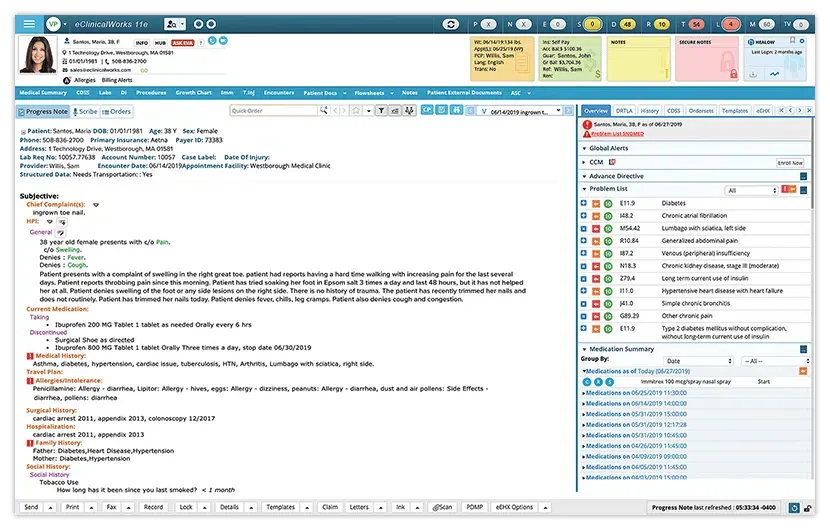
eClinicalWorks (eCW) pairs a broad ambulatory EHR and practice management platform with its healow® patient-engagement suite. It’s built to connect clinical documentation, front-desk workflows, and patient self-service in one ecosystem.
Best for:
Multi-provider clinics that want embedded online scheduling/telehealth tied closely to charting without stitching together separate access tools.
Key features:
healow Open Access online self-scheduling & waitlists
Telehealth, patient app & portal
EHR/PM: templates, eRx/eLabs, referrals, tasking, eligibility
Patient communications: reminders, broadcast campaigns
Check-in kiosk & digital intake with insurance capture
Reporting & registries; population-health add-ons
| Pros | Cons |
|---|---|
| Strong patient access stack out of the box | Implementation and admin overhead can be meaningful for small teams |
| Mature ambulatory workflows and large user community | UI and configuration can feel dense until standardized |
| Scales to multi-location groups; broad feature depth | For omnichannel reviews/GBM/DM inbox and Web Chat/SMS, many practices still add a growth layer i.e DemandHub |
| Consolidates many front-door tools into one vendor | Pricing is quote-based; TCO varies with modules and volume |
Pricing:
Custom/quote-based (depends on providers, modules, and services).
REAL Customer Reviews:
Here is what people say about eClinicalWorks:
“Ecw have no idea what they are doing there updates make work for providers and nurses, they NEVER FIX THE ISSUES always responding with the stupidest responses there are units of measure, and documentation needed for PGIP and insurance audits ECW operated with alot of IT’S not once has there updates been making it about medical updates, the worst EHR!” - Software Advice
“NO Customer service. You can’t get a live person to help you. EVERYTHING has to go through the online portal, including help requests, but if there is a dispute, they suddenly do not want to acknowledge those tickets. Canceling providers is a nightmare. I’ve paid for providers for well over a year because they would not remove them, and getting your money back won’t happen without a lawsuit (which we will be filing). They threaten to shut your access off if you don’t continue to pay for providers/services you aren’t using but fail to remove them timely. Unless you are prepared to have a dedicated person to monitor this account and all change orders, save your money and the headaches. Go to a proven system like Athena Healthcare, Cerner, GE Centricity, or NextGen. This software needs upgrading since it is not intuitive. It is clunky and cumbersome, but the lack of support gives it a “1” rating for me.” - G2
“Eclinicalworks is horrendously slow. Even on an extremely overpowered laptop with 32gb of ram and a fiber optic network connection this software is so slow that its painful. I have video of it taking more than 45 seconds to move from 1 screen to another in a patient chart, not even between patients. Most actions are painfully tedious, which I could tolerate if the system moved quickly.” - Capterra
What it does:
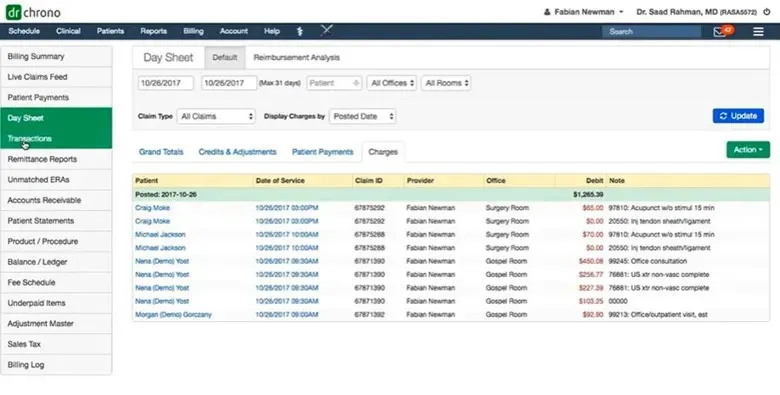
DrChrono is a cloud EHR + practice management + RCM platform best known for its mobile-first iPad/iPhone experience and highly customizable templates. It streamlines charting, online check-in, reminders, eRx/eLabs, telehealth, and claims—plus a marketplace of add-ons if you want to extend patient engagement or analytics.
Best for:
Teams that want fast, modern, iPad-centric charting and flexible templates—great for mobile/concierge, multi-site, and growing clinics that value usability.
Key features:
iPad/iPhone EHR with dictation, photos, drawings, and smart fields
Custom SOAP/templates; reusable forms and macros
Scheduling & reminders, patient portal, online check-in kiosk
eRx/EPCS & eLabs, telehealth, tasking/inbox
Billing/RCM, ERA/EDI, denial tracking
App marketplace like payments, engagement, analytics and imaging
| Pros | Cons |
|---|---|
| Excellent mobile UX; very fast encounter documentation | Reporting and enterprise controls lighter than big RCM suites |
| Highly customizable notes and forms | Costs can rise with add-ons or RCM services |
| Broad integration ecosystem; can tailor your stack | Native reviews/omnichannel inbox are limited; many clinics add a tool like DemandHub for growth communications |
| Scales from solo to multi-provider without heavy admin overhead |
Pricing:
Tiered/quote-based; generally mid-market with modular add-ons.
REAL Customer Feedback:
Here is what people say about DrChrono:
“Their abrupt slow speed in the middle of a busy day when our whole medical business comes to a stand still. It has caused us thousands of dollars of loss as providers were unable to see patients but we still had to pay them for their time.” - Capterra
“This software is difficult to use, especially when it comes to setting up appointment profiles and note templates. It takes an excessive number of clicks to create a locked note, making it a time-consuming process. I can’t wait to stop using it at the end of the year.” - FindEMR
“Can’t ever get a resolution to the problems we have. Been experiencing issues with the Day Sheet for a month now (duplicate totals) and NO resolution in sight. Can’t get someone ‘higher up’ to figure this out! Feel like we are in the Wizard of Oz and he’s off limits.” - G2
What it does:
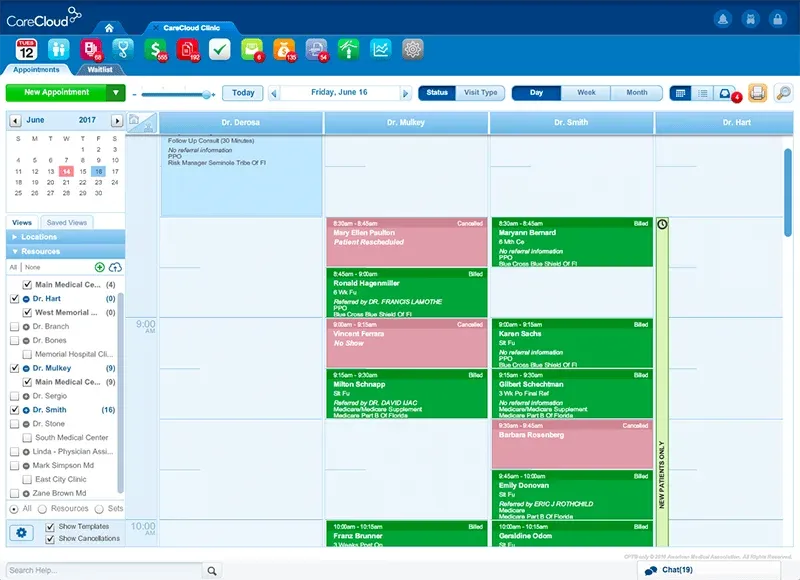
CareCloud delivers an integrated EHR, practice management and RCM platform with a strong emphasis on scheduling, billing efficiency and configurable workflows. It also offers optional outsourced RCM services, so you can keep billing in-house or hand parts of it to CareCloud’s team as you scale.
Best for:
Groups that want solid PM/billing, flexible deployment , and room to grow across multiple locations without jumping to a heavy enterprise suite.
Key features:
EHR & clinical tools: customizable templates, eRx/eLabs, tasking, telehealth
Scheduling & front desk: multi-location calendars, waitlists, eligibility checks
Billing/RCM: claim scrubbing, ERAs, denials worklists, A/R dashboards; optional outsourced RCM
Patient experience: reminders, portal, online intake; text/email statements & payments
Analytics: financial and operational dashboards; drill-down reports
Integrations & services: clearinghouses, payments, and add-on services
| Pros | Cons |
|---|---|
| Strong PM and billing focus; clear A/R and denials workflows | Quote-based pricing; total cost depends on software + services scope |
| Option to outsource RCM partially or fully without switching platforms | UI is functional over flashy; some screens feel busy until standardized |
| Scales from single site to multi-location with role-based access | Native omnichannel reviews/GBM/DM inbox are light |
| Balanced feature set without the enterprise overhead | Deep custom analytics may require admin time or services |
Pricing:
Custom/quote-based that varies with provider count, locations, claim volume and whether you use CareCloud’s RCM services.
REAL Customer Feedback:
Here is what people say about CareCloud:
“Dishonest, horrendous off-shore service, terrible feedback, outrageous rates.” - G2
“Many glitches with the program and frequently freezes up.” - Software Advice
“Customer support and transparency is an issue with this company as is complete lack of accountability, it seems.” - Capterra
What it does:
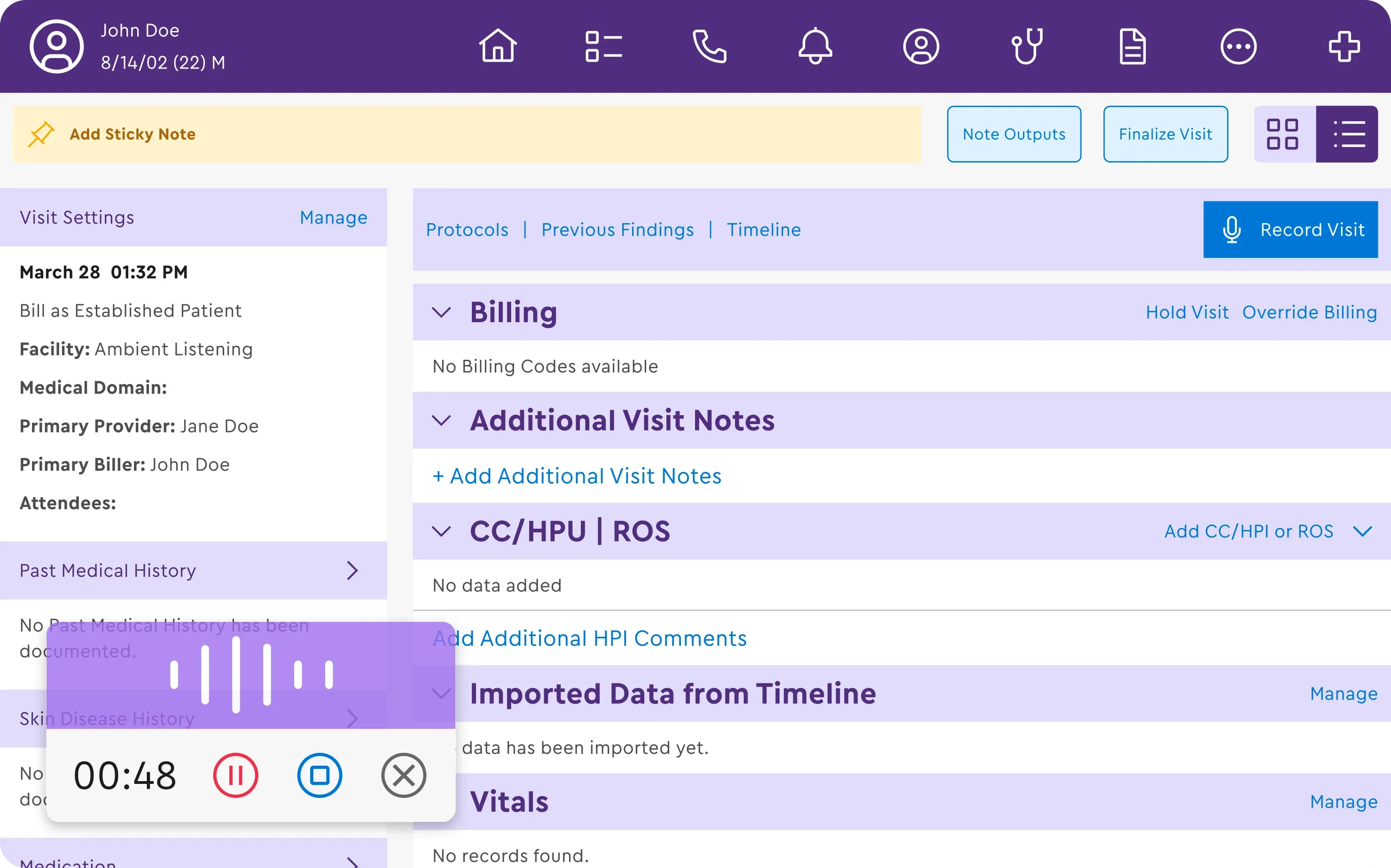
ModMed delivers a specialty-specific cloud EHR and practice management suite built around its EMA® EHR. It emphasizes template depth tailored to each specialty, rapid documentation, and connected PM, analytics, and patient communications so clinicians can move quickly without sacrificing completeness.
Best for:
Specialty groups that want deep, out-of-the-box clinical content and efficient charting tied to PM/billing versus configuring a broad, multi-specialty EHR from scratch.
Key features:
EMA specialty EHR with adaptive templates, procedure-driven workflows, and image/drawing tools
Practice Management & scheduling, eligibility, charge capture
Patient engagement: portal, intake forms, reminders, secure messaging
Analytics & reporting across clinical, operational, and financial KPIs
Integrated payments and optional add-ons
| Pros | Cons |
|---|---|
| Best-in-class specialty templates reduce clicks and note time | Premium quote-based pricing relative to SMB-focused tools |
| Smooth charge capture from documentation to claims | Breadth is strongest in targeted specialties; generalist use may feel less tailored |
| Balanced EHR, PM and analytics under one vendor | Omnichannel growth often needs a comms layer like DemandHub |
| Strong fit for procedure-heavy clinics needing visuals and specificity | Implementation and training required to unlock specialty depth |
Pricing:
Quote-based, varies by specialty, providers, locations and modules.
REAL Customer Feedback:
Here is what people say about ModMed:
“They do not have an open API and make it very difficult to integrate with other systems. They are partnered with many 3rd party vendors, offer services that feel pieced together and require a lot of man hours to manage. ModMed is expensive and offers poor support for the price. It’s impossible to reach a person for support. Separate logins are required for user, admin and support. Reporting is robust but slow and difficult. It takes many man hours to create and update customer reports. They also lack proper tracker for cosmetic patients thought the process to know which stage they are in. Quoting has improved but still leaves a lot to be desired. They “update” often but usually create additional fees for any added services. I would expect new features for the already high price.” - G2
“My biggest con is the reporting system I find difficult to navigate at times and as a person in the billing department, we do not like the transaction you have to use for a returned payment.” - Software Advice
“The billing department is the worst I have ever dealt with. They will not speak to the customer and create false invoices in clear violation of the contract. This is the worst experience I have ever had with a vendor.” - Capterra
What it does:
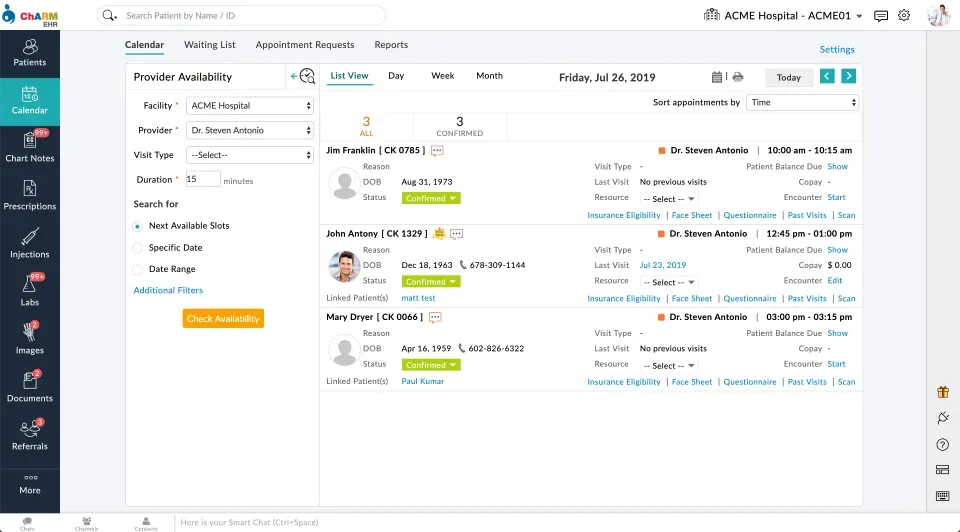
CharmHealth is a cloud, modular EHR, practice management platform with built-in telehealth, eRx/eLabs, patient portal, online intake and optional add-ons like eFax, texting and payments. Its à-la-carte approach lets smaller teams start light and add capability only when needed.
Best for:
Cost-conscious clinics that want a lightweight, flexible EHR/PM with solid patient self-service without the complexity or price of an enterprise RCM suite.
Key features:
EHR & templates
Scheduling & intake, patient portal, reminders, telehealth
Billing/RCM basics: eligibility, claims/ERAs, payments, statements
Add-ons: secure eFax, SMS/texting, inventory, labs integrations
APIs/marketplace to extend with payments, analytics, and more
| Pros | Cons |
|---|---|
| Transparent, modular pricing; easy to pilot and scale gradually | Add-on model can raise TCO if you need many modules |
| Light footprint with quick setup and patient-friendly portal/telehealth | Analytics and BI less robust than enterprise platforms |
| Good fit for solo/small groups that don’t need heavy RCM | Engagement extras (reviews, unified omni-inbox) are minimal—often paired with DemandHub |
Pricing:
Published tiers with optional add-ons; generally budget to mid-range depending on modules/SMS volume.
REAL Customer Feedback:
Here is what people say about CharmHealth:
“When I wanted to switch to the full-feature version, no one would contact me to perform the upgrade. I contacted them several times and received several promises that a member of the sales team would contact me. I also did not like the note template. It is based on the SOAP model, which was sufficient for a psychiatric practice, but not optimal. I would have preferred if CharmHealth provided the option of adding custom sections to the SOAP note template. When I asked how I could incorporate insurance-related requirements into the note, support responded with an answer that clearly indicated they did not read the requirements.” - G2
“Liked the online scheduling until they had issues with their capcha constantly causing problems for patients attempting to book so they now call the office which is exactly opposite of what we want out of online scheduling.” - Software Advice
“Worst customer service I’ve experienced, possibly ever. We have been waiting on Charm for TWO WEEKS just to allow us to charge our patients directly through Charm. They’re integrated with Bluefin (a credit card processor), but they literally seem to have zero idea how to set up our account. Each time I call, I speak to “CSR”, who says “sorry, I can’t do anything about this, let me send a message to our team”. To say our team is frustrated with Charm is an understatement. Do yourself a favor and use Elation Health.” - Capterra
Core Focus: AI engagement & growth layer
Patient Engagement: Excellent (unified inbox: SMS/Web Chat/GBM/FB/IG/email; reviews; text-to-pay)
Self-Service Scheduling: Widget + smart reminders
RCM/Billing Depth: — (pairs with your EHR)
Analytics/BI: Ops & ROI dashboards
Setup Complexity: Low
Pricing: From $59/mo
Best For: Fast wins in reviews/leads without EHR switch
Core Focus: EHR + PM + RCM
Patient Engagement: Basic reminders/portal; omni/reviews need add-on
Self-Service Scheduling: Good (with intake/portal)
RCM/Billing Depth: Strong (eligibility, scrubbing, denials)
Analytics/BI: Robust
Setup Complexity: High
Pricing: Quote (mid-premium)
Best For: Multi-location groups needing RCM rigor
Core Focus: EHR + PM + RCM + marketing
Patient Engagement: Strong (reviews, listings, website, text-to-pay)
Self-Service Scheduling: Strong
RCM/Billing Depth: Strong
Analytics/BI: Good
Setup Complexity: Medium-High
Pricing: Quote (mid-premium)
Best For: One-vendor stack for care→billing→growth
Core Focus: EHR + PM (specialty & access)
Patient Engagement: Good (portal/messaging)
Self-Service Scheduling: Excellent (self-scheduling)
RCM/Billing Depth: Strong
Analytics/BI: Strong
Setup Complexity: High
Pricing: Quote (premium)
Best For: Multi-specialty networks prioritizing access
Core Focus: EHR + PM + RCM (network rules)
Patient Engagement: Good (portal, reminders)
Self-Service Scheduling: Good
RCM/Billing Depth: Very strong (clean-claim focus)
Analytics/BI: Strong
Setup Complexity: High
Pricing: Quote (premium)
Best For: Revenue performance & payer compliance
Core Focus: EHR + PM + patient access
Patient Engagement: Good (PRM campaigns)
Self-Service Scheduling: Excellent (healow Open Access)
RCM/Billing Depth: Strong
Analytics/BI: Good
Setup Complexity: Medium-High
Pricing: Quote (mid-premium)
Best For: Deep self-service + telehealth tied to EHR
Core Focus: Mobile-first EHR/PM/RCM
Patient Engagement: Fair (add-ons recommended)
Self-Service Scheduling: Good
RCM/Billing Depth: Moderate–Strong
Analytics/BI: Moderate
Setup Complexity: Low-Medium
Pricing: Tiered/quote (mid)
Best For: iPad charting & flexible templates
Core Focus: EHR/PM + optional RCM services
Patient Engagement: Good (reminders/portal)
Self-Service Scheduling: Good
RCM/Billing Depth: Strong (plus outsource option)
Analytics/BI: Good
Setup Complexity: Medium
Pricing: Quote (varies with services)
Best For: PM/billing strength with RCM outsourcing
Core Focus: Specialty-specific EHR/PM
Patient Engagement: Good (portal/intake)
Self-Service Scheduling: Good
RCM/Billing Depth: Strong
Analytics/BI: Good
Setup Complexity: Medium-High
Pricing: Quote (premium)
Best For: Procedure-heavy specialties needing depth
Core Focus: Modular EHR/PM (à-la-carte)
Patient Engagement: Fair (add-ons)
Self-Service Scheduling: Good
RCM/Billing Depth: Moderate
Analytics/BI: Moderate
Setup Complexity: Low
Pricing: Transparent (budget–mid)
Best For: Cost-conscious teams starting light
If you don’t want to rip out your EHR and just need more patients, reviews, and faster replies, consider DemandHub on top of AdvancedMD. You will get a unified inbox that has SMS, Web Chat, Google Business Messages, FB/IG, email, AI review & recall automations, Web Chat / SMS, online booking widgets and text-to-pay.
If you need more new patients, reviews and fewer no-shows without replacing your EHR add DemandHub. It gives you a unified inbox that has SMS, Web Chat, GBM, FB/IG, email, AI review & recall automations, online booking widgets and text-to-pay. Fastest front-desk lift with minimal change management.
Switching from AdvancedMD to DemandHub may feel like a big project, but the process is designed to be simple, quick and stress-free with the right support. Here is how most practices transition smoothly:
Start by scheduling a personalized demo with the DemandHub team. They will walk you through the platform, highlight how it compares to AdvancedMD and show you how its unified inbox, AI-powered reviews and scheduling features can better support your practice.
After the demo, DemandHub creates a tailored onboarding plan for your practice. This includes activating essential tools like:
Online scheduling and reminders
AI-powered text messaging and follow-ups
Review request automation with QR codes and SMS
Text-to-pay and digital forms for faster payments
DemandHub’s support team helps migrate important data like contacts, appointment history, and review logs depending on what AdvancedMD allows for export. They ensure everything is handled securely and that nothing essential gets lost.
Because DemandHub is designed with simplicity in mind, your staff can usually get up and running within hours. Live training sessions, tutorials, and dedicated onboarding specialists make the process smooth and intuitive.
Once setup is complete, you can go live with DemandHub. From day one, practices begin reducing no-shows, attracting new patients through reviews and freeing up staff time with automation.
Thinking about making the switch?
Book your free DemandHub demo today and see how it can transform your practice compared to AdvancedMD.
If you like AdvancedMD for its end-to-end EHR, practice management, RCM stack but you are wrestling with cost, complexity, training time or lighter patient-engagement tools, you are not alone. Many clinics including multi-location groups start with AdvancedMD for its denial worklists, A/R controls and analytics, then look for alternatives or add-ons that deliver simpler workflows, stronger omnichannel messaging, review growth and faster patient self-service.
According to KLAS Research, clinician satisfaction with cross-system data sharing and integrated workflows remains low, with fragmentation across EHR, billing, and patient engagement systems continuing to drive operational inefficiencies and increased administrative workload in provider organizations.
This article breaks down the best AdvancedMD alternatives in 2026, who they are best for, and how they differ so you can pick software that fits your staffing model, budget and growth goals.
AdvancedMD is a configurable, enterprise-leaning platform that combines EHR, practice management and revenue cycle management. The platform is known for eligibility checks, claim scrubbing, denials worklists, ERA posting and robust analytics/BI, plus clinical tools like templates, eRx, eLabs and telemedicine. On the patient side, it offers online intake, reminders, portal and basic messaging. It’s designed to standardize operations across multi-provider, multi-location organizations.
Clinical care: Customizable EHR templates, problem lists, order sets
Scheduling & front desk: Advanced scheduling templates/slot rules, multi-location calendars
Billing & RCM: Claim scrubbing, ERA/EDI, denials worklists, A/R dashboards
Engagement & communications: Appointment reminders and basic two-way messaging
Analytics & admin: Dashboards/BI across clinical, financial, and operational KPIs
| Pros: | Cons: |
|---|---|
| RCM muscle built-in: Eligibility checks, claim scrubbing, denials worklists, ERA posting, and A/R dashboards reduce leakage and days in A/R | Complex to implement: Requires heavier onboarding and organization-wide workflow standardization |
| Enterprise-grade scheduling: Templates, slot rules, and multi-location calendars for complex provider coverage | Training time & learning curve: Power features add clicks and require structured training/SOPs |
| Robust analytics/BI: Visibility across clinical, operational, and financial KPIs with filtering by location, provider, payer, service line | Higher total cost of ownership: Core licenses + reminders, intake, analytics, texting, etc., can increase long-term cost |
| Configurable EHR: Flexible templates, eRx/eLabs, telemedicine, and scalable tasking infrastructure | Patient engagement is basic out of the box; most groups add a unified inbox or automation layer (e.g., DemandHub) |
| Governance & security: Role-based access, audit trails, multi-site controls suited for compliance-heavy orgs | UI density: Feature-rich screens can feel busy vs newer cloud-first apps |
| Ecosystem depth: Marketplace for payments, engagement, clearinghouse, and extensions | Support variability: Experience differs by module and account tier; strong SLAs usually need premium plans |
Total cost vs. actual usage: Licenses, texting/intake/analytics add-ons and clearinghouse/SMS fees can push TCO well beyond the initial quote across multiple sites.
Complexity & training burden: Power features are great, but they introduce clicks, workflows, and permissions that require structured onboarding and ongoing SOPs. Smaller teams can feel overtooled.
Patient engagement gaps: Out of the box, AdvancedMD’s reminders/portal are solid, but many groups want a unified inbox (SMS, Web Chat, Google Business Messages, FB/IG, email), review automation, missed-call textbacks, and text-to-pay often requiring an external layer.
Self-service expectations: Patients now expect online self-scheduling/rescheduling, smart waitlists, and mobile intake that reduces phone time; teams seek tools that make these flows effortless.
Marketing & growth under one roof: Owners want reviews, listings, web chat, campaigns, and attribution reporting to drive new-patient volume.
Analytics depth & usability: Finance and ops leads ask for role-based dashboards, cohort analysis, campaign ROI and no-show/utilization trends that are easy to slice without building custom reports.
Multi-location governance: Centralized template management, bulk updates, standardized comms, and cross-location insights can be hard to maintain without additional tooling.
Integration strategy: Teams with existing websites, CRMs, or marketing stacks prefer systems that plug in cleanly via APIs and webhooks rather than forcing all functions into one vendor.
Change management pace: Feature rollouts and configuration changes may move slower than front-office needs, prompting clinics to add nimble point solutions for immediate impact.
Below are top 9 alternatives to consider. To keep this practical, I have added a quick “What it does,” who it’s best for, features, pros/cons and some real feedback from G2, Capterra, Gartner and others.
What it does:
DemandHub is an AI-powered patient engagement and growth platform that layers on top of your current EHR (including AdvancedMD). It centralizes SMS, Web Chat, Google Business Messages, Facebook/Instagram DMs, and email in a single inbox, then automates the busywork: review requests, lead follow-ups, recalls/reactivations, online booking, and text-to-pay. The goal is to give more new patients, faster responses, fewer no-shows without touching your clinical/billing stack.
Best for:
Practices that want modern communications + reputation growth without replacing their EHR or retraining the entire team.
Key features:
Unified inbox for SMS, Web Chat, GBM, FB/IG and email
AI follow-ups for reviews, reactivation, missed-call textbacks, and lead nurturing
Web Chat / SMS so conversations continue after visitors leave your site
Online scheduling widgets with smart reminders/recalls
Text-to-pay for deposits, balances, and quick collections
Lead Manager and Team Chat to route inquiries and collaborate
Insights & ROI dashboards for response time, review velocity, booked-from-chat
| Pros | Cons |
|---|---|
| Fast wins in reviews, web-lead capture, and show rates | EHR integrations are growing but may be lighter than legacy all-in-one systems |
| Easy to deploy and train in hours for front-desk teams | Best fit is solo to mid-sized groups; very large enterprises may want extra governance |
| Affordable, transparent plans compared to all-in enterprise suites | |
| Plays nicely with your current EHR/PM |
Pricing:
Starts around $59/month, plan-based.
Why choose it over AdvancedMD alone?
AdvancedMD’s reminders/portal cover the basics, but DemandHub adds the omnichannel inbox, review engine, Web Chat / SMS, and text-to-pay that front desks use every hour. Most clinics see quicker uplift in new-patient flow and response speed by layering DemandHub without disrupting billing or documentation in AdvancedMD.
REAL customer feedback:
Here is what people say about DemandHub:
Demandhub provides a single point of contact for reaching out users across multiple channels such as Email, Sms, Whatsapp, social media etc. One feature which stands out is asking users to rate our services on google platforms. This has helped us in improving our ratings. - Source (Gartner)
We love how the chatbot chat turns into a text message thread so the client does not need to stay on our website in order to get their questions answered or appointments booked! Customer support is really responsive and helpful. - Source (G2)
Great customer experience and they were very patient with walking me through the onboarding process and usage. Has all the tools I need. - Source (Capterra)
What it does:
Tebra combines EHR, practice management, billing/RCM and patient-growth tools into one connected platform. Think about the front office, back office, online growth under a single login charting and claims on one side, online scheduling, reminders, review generation, directory sync and text-to-pay on the other.
Best for:
Independent and multi-location clinics that want a single vendor for clinical workflows, revenue cycle and patient acquisition without stitching together separate point solutions.
Key features:
Clinical: EHR with templates, eRx/eLabs, telehealth, tasking
RCM: eligibility, claim scrubbing, ERAs, denials worklists, A/R dashboards
Patient experience & growth: online booking, reminders, reviews & directory listings, website builder/SEO, reputation analytics
Payments: card-on-file, text-to-pay, estimates
Analytics: clinical, financial and marketing dashboards
| Pros | Cons |
|---|---|
| True all-in-one stack | Quote-based pricing; total cost can rise with modules/volume |
| Strong RCM depth with denial/AR controls | Heavier onboarding and change management than SMB tools |
| Built-in reviews/listings/website to increase demand | You may pay for modules you won’t fully use if needs are narrow |
| Standardizes processes across multi-location groups | Some teams report mixed support experiences by module |
Pricing:
Custom/quote-based
REAL Customer Reviews:
Here is what people say about Tebra.
“They stole over 20k. They recommended a shady untrustworthy biller. Everything was a lieThere isn’t enough room for all the terrible things I have to say about these shady people.” - Capterra
“POOR. I do not recommend even considering buying this product.” Software Advice
“Poor customer service and lack of support.” - G2
Related: Top Tebra Alternatives for Your Business in 2026
What it does:
NextGen is an enterprise-leaning EHR + practice management platform with strong patient access (self-scheduling, portal, secure messaging), robust specialty content, and regulatory depth. It’s built to standardize multi-location operations while giving clinical teams configurable templates, orders, and tasking.
Best for:
Multi-provider or multi-specialty groups that want deeper patient-access tools and mature compliance reporting especially those centralizing operations across locations.
Key features:
Patient access: online self-scheduling, portal, secure messaging, intake
Clinical: specialty templates, orders, eRx/eLabs, telehealth, care plans
PM/RCM: eligibility, claims/ERAs, denials workflows, statements, payment plans
Quality & compliance: eCQMs, MIPS/MACRA reporting, audit trails
Analytics: role-based dashboards and ad-hoc reporting
| Pros | Cons |
|---|---|
| Strong self-scheduling/portal experience tied to the chart | Heavier implementation and admin ownership vs SMB tools |
| Broad specialty content and configurable workflows | UI density/complexity can challenge small teams |
| Solid regulatory and quality reporting for value-based programs | Pricing is custom and can trend premium with modules |
| Scales well for multi-site governance | For omnichannel reviews/GBM/DM inbox, many groups still add a growth layer |
Pricing:
Quote-based that varies by providers/sites and selected modules.
REAL Customer Reviews:
Here is what people say about NextGen:
“Ineffective texting and emailing utilization without the required patient portal.” - Software Advice
“It’s sometimes very slow, we get a lot of down time, e-rx doesn’t work sometimes, patients complain that their scripts are not making it to the pharmacy. You have to be a member of the “community” in order to teach yourself how to do certain things.” - G2
What it does:
athenaOne bundles EHR, practice management, and RCM with a networked rules engine and payer connections aimed at improving clean-claim rates and reducing admin friction. Patient-facing tools (portal, messaging, reminders, intake) round out access and communication.
Best for:
Groups that prioritize billing performance and payer compliance at scale, and want a vendor-driven approach to RCM operations with predictable processes.
Key features:
EHR & orders: templates, problem lists, eRx/eLabs, telehealth, tasking
RCM: real-time eligibility, claim edits/scrubbing, denial analytics, ERA posting
Practice management: scheduling, recalls, work queues, payment plans
Patient access: portal, secure messaging, reminders, intake
Analytics: operational and financial dashboards; benchmarking from network data
| Pros | Cons |
|---|---|
| Strong clean-claim and denial-prevention tooling | Implementation and change management can be substantial for smaller teams |
| Network effects maintained centrally by vendor | Pricing is custom; total cost can rise with RCM/service scope |
| Solid PM + RCM workflows for multi-location groups | Omnichannel growth features like reviews, GBM/DM inbox, web chat often paired with an engagement layer |
| Patient tools integrated with scheduling and charting | Config changes and custom reports may require vendor involvement |
Pricing:
Quote-based; varies by providers, locations, and whether you use vendor RCM services.
REAL Customer Reviews:
Here is what people say about athenaOne:
“It reminds me of a portal that a huge medical center would use, which for hospitals etc is understandable, but for my primary care or psychiatrist using this portal makes it feel incredibly impersonal like I’m just another number in the system.” - Software Advice
“Let me start by saying this is my seventh EMR. A whole lot. It’s clunky, and requires so many clicks to complete a task. It is designed for coding and for billing and NOT for physician documentation. I would never wish this EMR on even my worst enemies. I spend at least 20% more time documenting them in the past. Horrible, Horrible, Horrible. stay away from this emr at all costs.” - G2
“Very disappointed and the case support is a waste of time. They tell you they will help you with claims but when you reach out to Athena for help they make excuses, take way too long to help, or never fix the issue.” - Capterra
What it does:
eClinicalWorks (eCW) pairs a broad ambulatory EHR and practice management platform with its healow® patient-engagement suite. It’s built to connect clinical documentation, front-desk workflows, and patient self-service in one ecosystem.
Best for:
Multi-provider clinics that want embedded online scheduling/telehealth tied closely to charting without stitching together separate access tools.
Key features:
healow Open Access online self-scheduling & waitlists
Telehealth, patient app & portal
EHR/PM: templates, eRx/eLabs, referrals, tasking, eligibility
Patient communications: reminders, broadcast campaigns
Check-in kiosk & digital intake with insurance capture
Reporting & registries; population-health add-ons
| Pros | Cons |
|---|---|
| Strong patient access stack out of the box | Implementation and admin overhead can be meaningful for small teams |
| Mature ambulatory workflows and large user community | UI and configuration can feel dense until standardized |
| Scales to multi-location groups; broad feature depth | For omnichannel reviews/GBM/DM inbox and Web Chat/SMS, many practices still add a growth layer i.e DemandHub |
| Consolidates many front-door tools into one vendor | Pricing is quote-based; TCO varies with modules and volume |
Pricing:
Custom/quote-based (depends on providers, modules, and services).
REAL Customer Reviews:
Here is what people say about eClinicalWorks:
“Ecw have no idea what they are doing there updates make work for providers and nurses, they NEVER FIX THE ISSUES always responding with the stupidest responses there are units of measure, and documentation needed for PGIP and insurance audits ECW operated with alot of IT’S not once has there updates been making it about medical updates, the worst EHR!” - Software Advice
“NO Customer service. You can’t get a live person to help you. EVERYTHING has to go through the online portal, including help requests, but if there is a dispute, they suddenly do not want to acknowledge those tickets. Canceling providers is a nightmare. I’ve paid for providers for well over a year because they would not remove them, and getting your money back won’t happen without a lawsuit (which we will be filing). They threaten to shut your access off if you don’t continue to pay for providers/services you aren’t using but fail to remove them timely. Unless you are prepared to have a dedicated person to monitor this account and all change orders, save your money and the headaches. Go to a proven system like Athena Healthcare, Cerner, GE Centricity, or NextGen. This software needs upgrading since it is not intuitive. It is clunky and cumbersome, but the lack of support gives it a “1” rating for me.” - G2
“Eclinicalworks is horrendously slow. Even on an extremely overpowered laptop with 32gb of ram and a fiber optic network connection this software is so slow that its painful. I have video of it taking more than 45 seconds to move from 1 screen to another in a patient chart, not even between patients. Most actions are painfully tedious, which I could tolerate if the system moved quickly.” - Capterra
What it does:
DrChrono is a cloud EHR + practice management + RCM platform best known for its mobile-first iPad/iPhone experience and highly customizable templates. It streamlines charting, online check-in, reminders, eRx/eLabs, telehealth, and claims—plus a marketplace of add-ons if you want to extend patient engagement or analytics.
Best for:
Teams that want fast, modern, iPad-centric charting and flexible templates—great for mobile/concierge, multi-site, and growing clinics that value usability.
Key features:
iPad/iPhone EHR with dictation, photos, drawings, and smart fields
Custom SOAP/templates; reusable forms and macros
Scheduling & reminders, patient portal, online check-in kiosk
eRx/EPCS & eLabs, telehealth, tasking/inbox
Billing/RCM, ERA/EDI, denial tracking
App marketplace like payments, engagement, analytics and imaging
| Pros | Cons |
|---|---|
| Excellent mobile UX; very fast encounter documentation | Reporting and enterprise controls lighter than big RCM suites |
| Highly customizable notes and forms | Costs can rise with add-ons or RCM services |
| Broad integration ecosystem; can tailor your stack | Native reviews/omnichannel inbox are limited; many clinics add a tool like DemandHub for growth communications |
| Scales from solo to multi-provider without heavy admin overhead |
Pricing:
Tiered/quote-based; generally mid-market with modular add-ons.
REAL Customer Feedback:
Here is what people say about DrChrono:
“Their abrupt slow speed in the middle of a busy day when our whole medical business comes to a stand still. It has caused us thousands of dollars of loss as providers were unable to see patients but we still had to pay them for their time.” - Capterra
“This software is difficult to use, especially when it comes to setting up appointment profiles and note templates. It takes an excessive number of clicks to create a locked note, making it a time-consuming process. I can’t wait to stop using it at the end of the year.” - FindEMR
“Can’t ever get a resolution to the problems we have. Been experiencing issues with the Day Sheet for a month now (duplicate totals) and NO resolution in sight. Can’t get someone ‘higher up’ to figure this out! Feel like we are in the Wizard of Oz and he’s off limits.” - G2
What it does:
CareCloud delivers an integrated EHR, practice management and RCM platform with a strong emphasis on scheduling, billing efficiency and configurable workflows. It also offers optional outsourced RCM services, so you can keep billing in-house or hand parts of it to CareCloud’s team as you scale.
Best for:
Groups that want solid PM/billing, flexible deployment , and room to grow across multiple locations without jumping to a heavy enterprise suite.
Key features:
EHR & clinical tools: customizable templates, eRx/eLabs, tasking, telehealth
Scheduling & front desk: multi-location calendars, waitlists, eligibility checks
Billing/RCM: claim scrubbing, ERAs, denials worklists, A/R dashboards; optional outsourced RCM
Patient experience: reminders, portal, online intake; text/email statements & payments
Analytics: financial and operational dashboards; drill-down reports
Integrations & services: clearinghouses, payments, and add-on services
| Pros | Cons |
|---|---|
| Strong PM and billing focus; clear A/R and denials workflows | Quote-based pricing; total cost depends on software + services scope |
| Option to outsource RCM partially or fully without switching platforms | UI is functional over flashy; some screens feel busy until standardized |
| Scales from single site to multi-location with role-based access | Native omnichannel reviews/GBM/DM inbox are light |
| Balanced feature set without the enterprise overhead | Deep custom analytics may require admin time or services |
Pricing:
Custom/quote-based that varies with provider count, locations, claim volume and whether you use CareCloud’s RCM services.
REAL Customer Feedback:
Here is what people say about CareCloud:
“Dishonest, horrendous off-shore service, terrible feedback, outrageous rates.” - G2
“Many glitches with the program and frequently freezes up.” - Software Advice
“Customer support and transparency is an issue with this company as is complete lack of accountability, it seems.” - Capterra
What it does:
ModMed delivers a specialty-specific cloud EHR and practice management suite built around its EMA® EHR. It emphasizes template depth tailored to each specialty, rapid documentation, and connected PM, analytics, and patient communications so clinicians can move quickly without sacrificing completeness.
Best for:
Specialty groups that want deep, out-of-the-box clinical content and efficient charting tied to PM/billing versus configuring a broad, multi-specialty EHR from scratch.
Key features:
EMA specialty EHR with adaptive templates, procedure-driven workflows, and image/drawing tools
Practice Management & scheduling, eligibility, charge capture
Patient engagement: portal, intake forms, reminders, secure messaging
Analytics & reporting across clinical, operational, and financial KPIs
Integrated payments and optional add-ons
| Pros | Cons |
|---|---|
| Best-in-class specialty templates reduce clicks and note time | Premium quote-based pricing relative to SMB-focused tools |
| Smooth charge capture from documentation to claims | Breadth is strongest in targeted specialties; generalist use may feel less tailored |
| Balanced EHR, PM and analytics under one vendor | Omnichannel growth often needs a comms layer like DemandHub |
| Strong fit for procedure-heavy clinics needing visuals and specificity | Implementation and training required to unlock specialty depth |
Pricing:
Quote-based, varies by specialty, providers, locations and modules.
REAL Customer Feedback:
Here is what people say about ModMed:
“They do not have an open API and make it very difficult to integrate with other systems. They are partnered with many 3rd party vendors, offer services that feel pieced together and require a lot of man hours to manage. ModMed is expensive and offers poor support for the price. It’s impossible to reach a person for support. Separate logins are required for user, admin and support. Reporting is robust but slow and difficult. It takes many man hours to create and update customer reports. They also lack proper tracker for cosmetic patients thought the process to know which stage they are in. Quoting has improved but still leaves a lot to be desired. They “update” often but usually create additional fees for any added services. I would expect new features for the already high price.” - G2
“My biggest con is the reporting system I find difficult to navigate at times and as a person in the billing department, we do not like the transaction you have to use for a returned payment.” - Software Advice
“The billing department is the worst I have ever dealt with. They will not speak to the customer and create false invoices in clear violation of the contract. This is the worst experience I have ever had with a vendor.” - Capterra
What it does:
CharmHealth is a cloud, modular EHR, practice management platform with built-in telehealth, eRx/eLabs, patient portal, online intake and optional add-ons like eFax, texting and payments. Its à-la-carte approach lets smaller teams start light and add capability only when needed.
Best for:
Cost-conscious clinics that want a lightweight, flexible EHR/PM with solid patient self-service without the complexity or price of an enterprise RCM suite.
Key features:
EHR & templates
Scheduling & intake, patient portal, reminders, telehealth
Billing/RCM basics: eligibility, claims/ERAs, payments, statements
Add-ons: secure eFax, SMS/texting, inventory, labs integrations
APIs/marketplace to extend with payments, analytics, and more
| Pros | Cons |
|---|---|
| Transparent, modular pricing; easy to pilot and scale gradually | Add-on model can raise TCO if you need many modules |
| Light footprint with quick setup and patient-friendly portal/telehealth | Analytics and BI less robust than enterprise platforms |
| Good fit for solo/small groups that don’t need heavy RCM | Engagement extras (reviews, unified omni-inbox) are minimal—often paired with DemandHub |
Pricing:
Published tiers with optional add-ons; generally budget to mid-range depending on modules/SMS volume.
REAL Customer Feedback:
Here is what people say about CharmHealth:
“When I wanted to switch to the full-feature version, no one would contact me to perform the upgrade. I contacted them several times and received several promises that a member of the sales team would contact me. I also did not like the note template. It is based on the SOAP model, which was sufficient for a psychiatric practice, but not optimal. I would have preferred if CharmHealth provided the option of adding custom sections to the SOAP note template. When I asked how I could incorporate insurance-related requirements into the note, support responded with an answer that clearly indicated they did not read the requirements.” - G2
“Liked the online scheduling until they had issues with their capcha constantly causing problems for patients attempting to book so they now call the office which is exactly opposite of what we want out of online scheduling.” - Software Advice
“Worst customer service I’ve experienced, possibly ever. We have been waiting on Charm for TWO WEEKS just to allow us to charge our patients directly through Charm. They’re integrated with Bluefin (a credit card processor), but they literally seem to have zero idea how to set up our account. Each time I call, I speak to “CSR”, who says “sorry, I can’t do anything about this, let me send a message to our team”. To say our team is frustrated with Charm is an understatement. Do yourself a favor and use Elation Health.” - Capterra
Core Focus: AI engagement & growth layer
Patient Engagement: Excellent (unified inbox: SMS/Web Chat/GBM/FB/IG/email; reviews; text-to-pay)
Self-Service Scheduling: Widget + smart reminders
RCM/Billing Depth: — (pairs with your EHR)
Analytics/BI: Ops & ROI dashboards
Setup Complexity: Low
Pricing: From $59/mo
Best For: Fast wins in reviews/leads without EHR switch
Core Focus: EHR + PM + RCM
Patient Engagement: Basic reminders/portal; omni/reviews need add-on
Self-Service Scheduling: Good (with intake/portal)
RCM/Billing Depth: Strong (eligibility, scrubbing, denials)
Analytics/BI: Robust
Setup Complexity: High
Pricing: Quote (mid-premium)
Best For: Multi-location groups needing RCM rigor
Core Focus: EHR + PM + RCM + marketing
Patient Engagement: Strong (reviews, listings, website, text-to-pay)
Self-Service Scheduling: Strong
RCM/Billing Depth: Strong
Analytics/BI: Good
Setup Complexity: Medium-High
Pricing: Quote (mid-premium)
Best For: One-vendor stack for care→billing→growth
Core Focus: EHR + PM (specialty & access)
Patient Engagement: Good (portal/messaging)
Self-Service Scheduling: Excellent (self-scheduling)
RCM/Billing Depth: Strong
Analytics/BI: Strong
Setup Complexity: High
Pricing: Quote (premium)
Best For: Multi-specialty networks prioritizing access
Core Focus: EHR + PM + RCM (network rules)
Patient Engagement: Good (portal, reminders)
Self-Service Scheduling: Good
RCM/Billing Depth: Very strong (clean-claim focus)
Analytics/BI: Strong
Setup Complexity: High
Pricing: Quote (premium)
Best For: Revenue performance & payer compliance
Core Focus: EHR + PM + patient access
Patient Engagement: Good (PRM campaigns)
Self-Service Scheduling: Excellent (healow Open Access)
RCM/Billing Depth: Strong
Analytics/BI: Good
Setup Complexity: Medium-High
Pricing: Quote (mid-premium)
Best For: Deep self-service + telehealth tied to EHR
Core Focus: Mobile-first EHR/PM/RCM
Patient Engagement: Fair (add-ons recommended)
Self-Service Scheduling: Good
RCM/Billing Depth: Moderate–Strong
Analytics/BI: Moderate
Setup Complexity: Low-Medium
Pricing: Tiered/quote (mid)
Best For: iPad charting & flexible templates
Core Focus: EHR/PM + optional RCM services
Patient Engagement: Good (reminders/portal)
Self-Service Scheduling: Good
RCM/Billing Depth: Strong (plus outsource option)
Analytics/BI: Good
Setup Complexity: Medium
Pricing: Quote (varies with services)
Best For: PM/billing strength with RCM outsourcing
Core Focus: Specialty-specific EHR/PM
Patient Engagement: Good (portal/intake)
Self-Service Scheduling: Good
RCM/Billing Depth: Strong
Analytics/BI: Good
Setup Complexity: Medium-High
Pricing: Quote (premium)
Best For: Procedure-heavy specialties needing depth
Core Focus: Modular EHR/PM (à-la-carte)
Patient Engagement: Fair (add-ons)
Self-Service Scheduling: Good
RCM/Billing Depth: Moderate
Analytics/BI: Moderate
Setup Complexity: Low
Pricing: Transparent (budget–mid)
Best For: Cost-conscious teams starting light
If you don’t want to rip out your EHR and just need more patients, reviews, and faster replies, consider DemandHub on top of AdvancedMD. You will get a unified inbox that has SMS, Web Chat, Google Business Messages, FB/IG, email, AI review & recall automations, Web Chat / SMS, online booking widgets and text-to-pay.
If you need more new patients, reviews and fewer no-shows without replacing your EHR add DemandHub. It gives you a unified inbox that has SMS, Web Chat, GBM, FB/IG, email, AI review & recall automations, online booking widgets and text-to-pay. Fastest front-desk lift with minimal change management.
Switching from AdvancedMD to DemandHub may feel like a big project, but the process is designed to be simple, quick and stress-free with the right support. Here is how most practices transition smoothly:
Start by scheduling a personalized demo with the DemandHub team. They will walk you through the platform, highlight how it compares to AdvancedMD and show you how its unified inbox, AI-powered reviews and scheduling features can better support your practice.
After the demo, DemandHub creates a tailored onboarding plan for your practice. This includes activating essential tools like:
Online scheduling and reminders
AI-powered text messaging and follow-ups
Review request automation with QR codes and SMS
Text-to-pay and digital forms for faster payments
DemandHub’s support team helps migrate important data like contacts, appointment history, and review logs depending on what AdvancedMD allows for export. They ensure everything is handled securely and that nothing essential gets lost.
Because DemandHub is designed with simplicity in mind, your staff can usually get up and running within hours. Live training sessions, tutorials, and dedicated onboarding specialists make the process smooth and intuitive.
Once setup is complete, you can go live with DemandHub. From day one, practices begin reducing no-shows, attracting new patients through reviews and freeing up staff time with automation.
Thinking about making the switch?
Book your free DemandHub demo today and see how it can transform your practice compared to AdvancedMD.